
Notice
Recent Posts
Recent Comments
Link
| 일 | 월 | 화 | 수 | 목 | 금 | 토 |
|---|---|---|---|---|---|---|
| 1 | 2 | 3 | ||||
| 4 | 5 | 6 | 7 | 8 | 9 | 10 |
| 11 | 12 | 13 | 14 | 15 | 16 | 17 |
| 18 | 19 | 20 | 21 | 22 | 23 | 24 |
| 25 | 26 | 27 | 28 | 29 | 30 | 31 |
Tags
- 닌텐도
- Synology
- Timezone
- SBX
- Python
- nodeexporter
- Nas
- PyMuPDF
- pillow
- dsm
- 17.6.3
- pdfminer
- IP변경
- Elasticsearch
- 도커마운트
- docker
- react
- promethues
- Github
- VMware
- gitlab
- 우분투
- CVE-2025-55182
- ubuntu
- DS918+
Archives
- Today
- Total
보조기억장치
Helm 본문
개요
Helm 은 yum/dnf 서버 패키지를 관리하듯, k8s 앱을 관리합니다
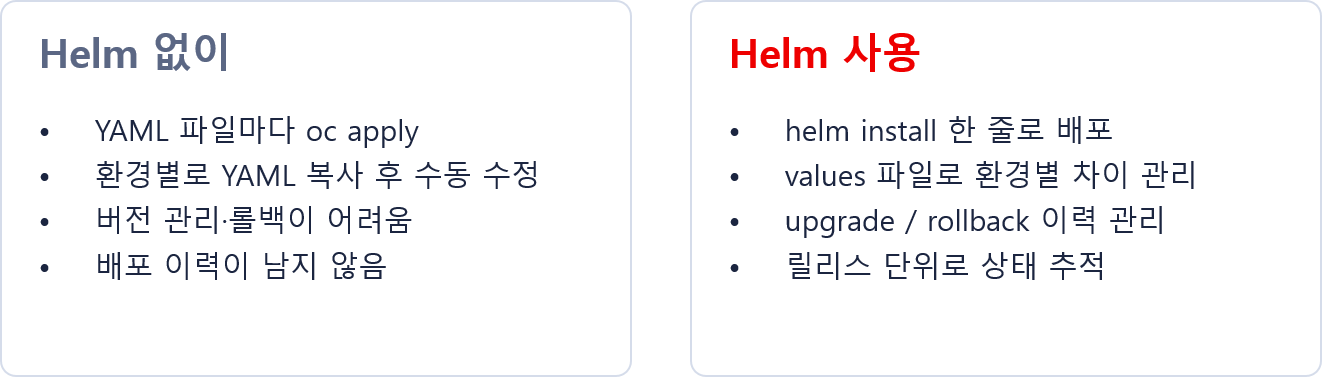
Helm 구성요소
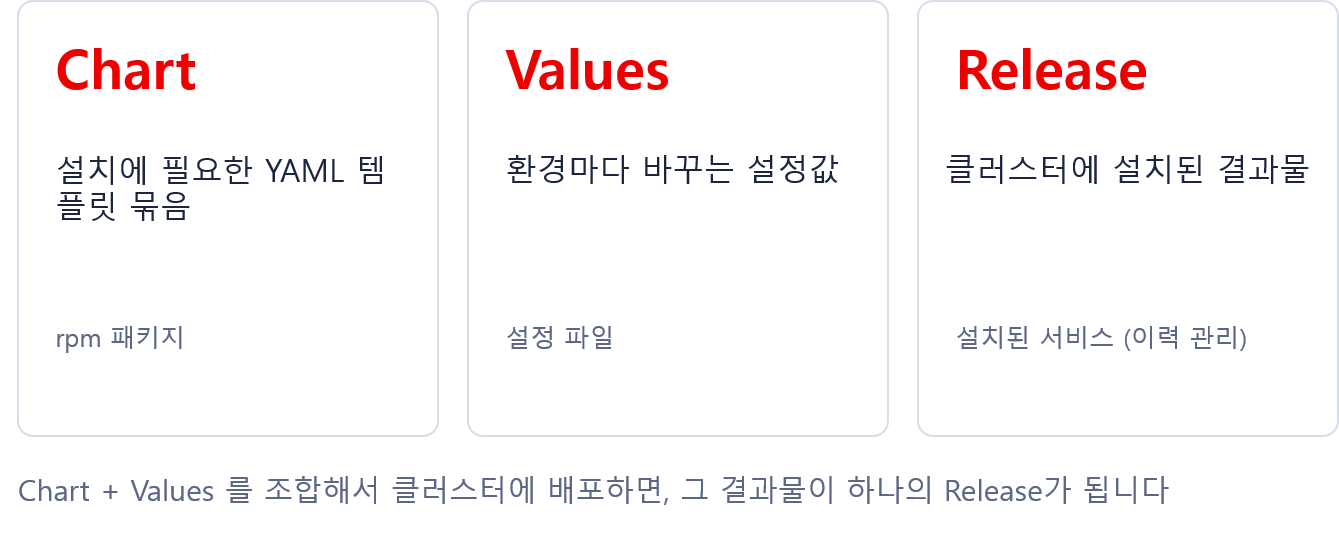
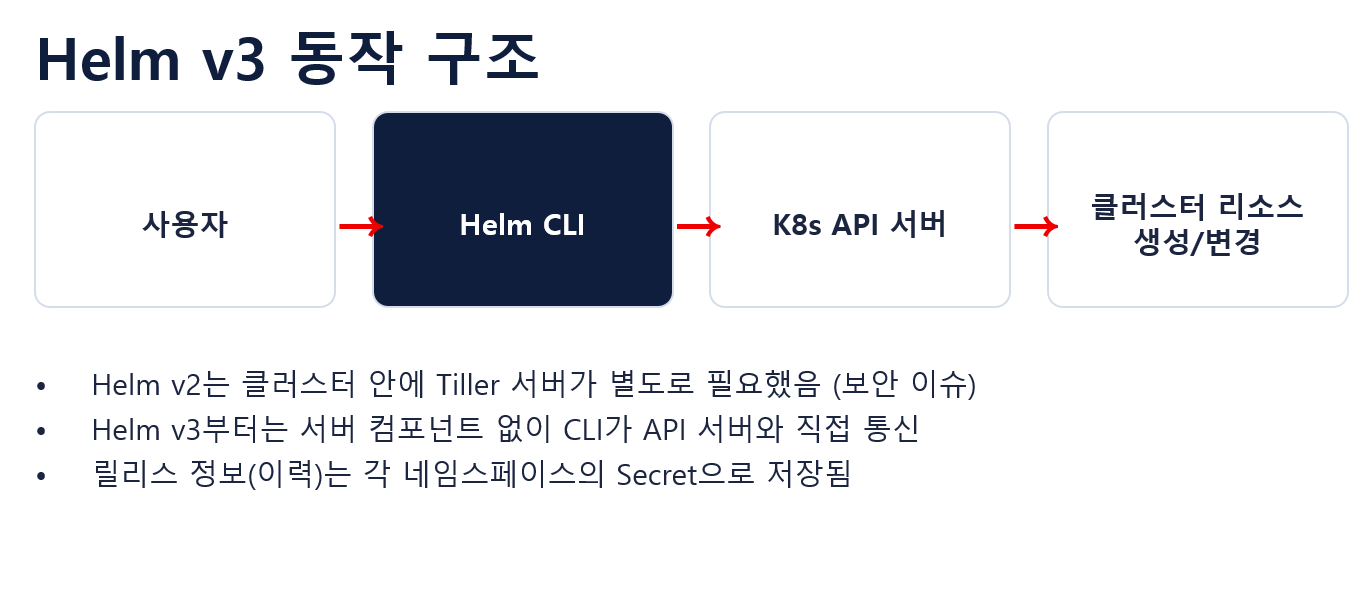
Secret
oc get secret
NAME                          TYPE                 DATA   AGE
sh.helm.release.v1.myapp.v1   helm.sh/release.v1   1      17h
sh.helm.release.v1.myapp.v2   helm.sh/release.v1   1      17h
sh.helm.release.v1.myapp.v3   helm.sh/release.v1   1      17h
sh.helm.release.v1.myapp.v4   helm.sh/release.v1   1      17h
sh.helm.release.v1.myapp.v5   helm.sh/release.v1   1      16h
Helm 패키지 설치
# 설치진행(스크립트 방식)
curl -fsSL <https://raw.githubusercontent.com/helm/helm/main/scripts/get-helm-3> | bash
helm version --short
v3.22.0+g144ca65   # v3 마지막 릴리즈, Helm v4 출시

# project 및 테스트디렉토리 생성
oc new-project helm-lab
mkdir -p /root/helm-lab
cd /root/helm-lab

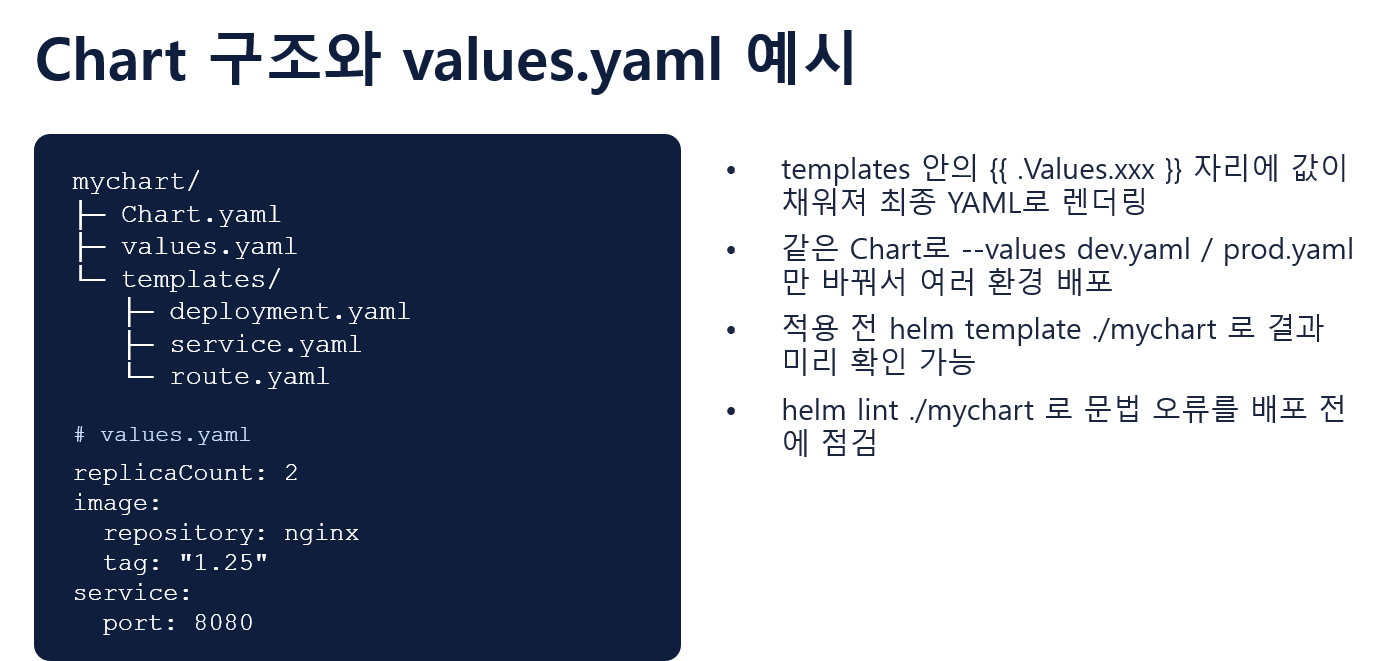
# 배포에 필요한 기본 파일과 폴더 구조가 자동으로 생성
helm create myapp

`tree
.
└── myapp
    ├── charts
    ├── Chart.yaml
    ├── templates
    │   ├── deployment.yaml
    │   ├── _helpers.tpl
    │   ├── hpa.yaml
    │   ├── httproute.yaml
    │   ├── ingress.yaml
    │   ├── NOTES.txt
    │   ├── serviceaccount.yaml
    │   ├── service.yaml
    │   └── tests
    │       └── test-connection.yaml
    └── values.yaml`
파일 구성 확인
`
**Chart.yaml → 이 Chart 자체의 이름·버전 같은 정보**
name       → Chart 이름
version    → Chart 자체의 버전
appVersion → Chart로 배포하는 애플리케이션의 버전

values.yaml → 사용자가 변경하는 설정값
# values.yaml 자체가 OpenShift에 배포되는 YAML이 아니고 아래와 같이 정의하면
replicaCount: 1

# templates/deployment.yaml 안에서 아래와 같은 형식으로 매핑되어
spec:
  replicas: {{ .Values.replicaCount }}

# Helm 랜더링을 거치면 아래 형태로 최종변환
spec:
  replicas: 1

templates/ → Deployment, Service 등을 만들어내는 YAML 템플릿

즉, values.yaml → templates/*.yaml → 실제 Kubernetes/OpenShift YAML → 리소스 생성
`

====
6:replicaCount: 1
9:image:
10-  repository: nginx
12-  pullPolicy: IfNotPresent
14-  tag: ""
15-
--
53:service:
55-  type: ClusterIP
57-  port: 80
values와 Deployment 관계
**`즉 템플릿은 틀이고 values.yaml은 그 틀에 집어넣을 값`**

grep -n '\.Values' templates/deployment.yaml
8:  {{- if not .Values.autoscaling.enabled }}
9:  replicas: {{ .Values.replicaCount }}
16:      {{- with .Values.podAnnotations }}
22:        {{- with .Values.podLabels }}
26:      {{- with .Values.imagePullSecrets }}
31:      {{- with .Values.podSecurityContext }}
37:          {{- with .Values.securityContext }}
41:          image: "{{ .Values.image.repository }}:{{ .Values.image.tag | default .Chart.AppVersion }}"
42:          imagePullPolicy: {{ .Values.image.pullPolicy }}
45:              containerPort: {{ .Values.service.port }}
47:          {{- with .Values.livenessProbe }}
51:          {{- with .Values.readinessProbe }}
55:          {{- with .Values.resources }}
59:          {{- with .Values.volumeMounts }}
63:      {{- with .Values.volumes }}
67:      {{- with .Values.nodeSelector }}
71:      {{- with .Values.affinity }}
75:      {{- with .Values.tolerations }}
helm template로 실제 YAML 확인
**`helm template은 실제 클러스터에 설치하지 않고, Helm Chart가 최종적으로 만들어낼 K8s YAML을 미리 보는 명령어
`**

helm template myapp .

helm template myapp . | grep -A 3 'replicas:'
  replicas: 1
  selector:
    matchLabels:
      app.kubernetes.io/name: myapp

helm template myapp . | grep 'image:'
          image: "nginx:1.16.0"
set으로 values 값 덮어쓰기
`원본 values.yaml은 replicas: 1 이지만 --set 으로 지정한값으로 Overwirte 됨`

helm template myapp . \
  --set replicaCount=3 \
  | grep -A 3 'replicas:'

  replicas: 3
values-dev.yaml (여러 환경 만들기)
`values.yaml에는 replicaCount: 1이라는 기본값을 지정했지만 values-dev.yaml 에서 2로 Overwrite 되어 최종 결과는 replicaCount: 2 적용됨`

# yaml 생성
cat > values-dev.yaml <<'EOF'
replicaCount: 2

image:
  repository: mirror.ocp.lab:8443/admin/httpd-24
  pullPolicy: IfNotPresent
  tag: "latest"

service:
  type: ClusterIP
  port: 8080
EOF

helm template myapp . -f values-dev.yaml |grep -E 'replicas:|image:|containerPort:'
  replicas: 2
          image: "mirror.ocp.lab:8443/admin/httpd-24:latest"
              containerPort: 8080
Helm 설치 및 변경
helm install myapp . \
  -f values-dev.yaml \
  -n helm-lab

NAME: myapp
LAST DEPLOYED: Mon Sep 28 15:40:02 2026
NAMESPACE: helm-lab
STATUS: deployed
REVISION: 1

# 생성된 리소스 확인
helm list -n helm-lab
NAME    NAMESPACE       REVISION        UPDATED                                 STATUS          CHART           APP VERSION
myapp   helm-lab        1               2026-09-28 15:40:02.036665897 +0900 KST deployed        myapp-0.1.0     1.16.0

`HTTP 요청을 보내면 httpd가 403을 반환하고, Helm 기본 Chart의 probe는 성공 코드(2xx/3xx)를 기대하기 때문에 Deployment, Pod 생성 실패합니다`

# 수정(Probe 비활성화 - null)
sed -i \
  's/^livenessProbe: {}$/livenessProbe: null/; s/^readinessProbe: {}$/readinessProbe: null/' values-dev.yaml

# 랜더링(사전검증)
helm template myapp . -f values-dev.yaml \
  | grep -A 5 -E 'livenessProbe:|readinessProbe:'

# Helm 변경(helm upgrade)
 helm upgrade myapp . \
  -f values-dev.yaml \
  -n helm-lab
Release "myapp" has been upgraded. Happy Helming!
NAME: myapp
LAST DEPLOYED: Mon Sep 28 15:52:19 2026
NAMESPACE: helm-lab
STATUS: deployed
REVISION: 2

helm history myapp -n helm-lab
REVISION        UPDATED                         STATUS          CHART           APP VERSION     DESCRIPTION
1               Mon Sep 28 15:40:02 2026        superseded      myapp-0.1.0     1.16.0          Install complete
2               Mon Sep 28 15:52:19 2026        deployed        myapp-0.1.0     1.16.0          Upgrade complete
Rollback
helm rollback myapp 1 -n helm-lab

# Rollback 자체도 새로운 Revision으로 기록
helm history myapp -n helm-lab
REVISION        UPDATED                         STATUS          CHART           APP VERSION     DESCRIPTION
1               Mon Sep 28 15:40:02 2026        superseded      myapp-0.1.0     1.16.0          Install complete
2               Mon Sep 28 15:52:19 2026        superseded      myapp-0.1.0     1.16.0          Upgrade complete
3               Mon Sep 28 15:54:08 2026        deployed        myapp-0.1.0     1.16.0          Rollback to 1

oc get pod -n helm-lab
NAME                     READY   STATUS    RESTARTS      AGE
myapp-5d4d967c6d-gvktj   0/1     Running   3 (11s ago)   101s
myapp-6f76849b68-cv4fc   1/1     Running   0             3m29s
myapp-6f76849b68-gmfjj   1/1     Running   0             3m28s

**`새 ReplicaSet으로 RollingUpdate 했지만, 새 Pod가 probe에서 실패하여 전환이 완료되지 못하고 기존 정상 Pod가 남아 있는 상태`**

# Revision 2 복구
helm rollback myapp 2 -n helm-lab
Rollback was a success! Happy Helming!
[root@bastion myapp]# oc get deployment,pod -n helm-lab
NAME                    READY   UP-TO-DATE   AVAILABLE   AGE
deployment.apps/myapp   2/2     2            2           16m

NAME                         READY   STATUS    RESTARTS   AGE
pod/myapp-6f76849b68-cv4fc   1/1     Running   0          4m37s
pod/myapp-6f76849b68-gmfjj   1/1     Running   0          4m36s

helm history myapp
REVISION        UPDATED                         STATUS          CHART           APP VERSION     DESCRIPTION
1               Mon Sep 28 15:40:02 2026        superseded      myapp-0.1.0     1.16.0          Install complete
2               Mon Sep 28 15:52:19 2026        superseded      myapp-0.1.0     1.16.0          Upgrade complete
3               Mon Sep 28 15:54:08 2026        superseded      myapp-0.1.0     1.16.0          Rollback to 1
4               Mon Sep 28 15:56:46 2026        deployed        myapp-0.1.0     1.16.0          Rollback to 2
배포된 Release 내부 확인
# 사용자가 지정한 값 위주
helm get values myapp -n helm-lab
USER-SUPPLIED VALUES:
image:
  pullPolicy: IfNotPresent
  repository: mirror.ocp.lab:8443/admin/httpd-24
  tag: latest
livenessProbe: null
readinessProbe: null
replicaCount: 2
route:
  enabled: true
service:
  port: 8080
  type: ClusterIP

# Chart 기본값 및 적용된 값까지 포함
helm get values myapp --all

# 완성된 YAML
helm get manifest myapp -n helm-lab | head -50
OpenShift Route를 Helm Template으로 추가
`현재 기본 helm Chart에는 K8s Ingress/HTTPRoute는 있지만 OpenShift의 Route는 없음`

cat >> values-dev.yaml <<'EOF'

route:
  enabled: true
EOF

# Route Template 생성
cat > templates/route.yaml <<'EOF'
{{- if .Values.route.enabled }}
apiVersion: route.openshift.io/v1
kind: Route
metadata:
  name: {{ include "myapp.fullname" . }}
  labels:
    {{- include "myapp.labels" . | nindent 4 }}
spec:
  to:
    kind: Service
    name: {{ include "myapp.fullname" . }}
  port:
    targetPort: http
{{- end }}
EOF

`{{ include "myapp.fullname" . }} 이 문법은 _helpers.tpl에 정의된 재사용 가능한 Helm Template 함수를 호출`

# 렌더링
helm template myapp . -f values-dev.yaml \
  | grep -A 15 '^kind: Route'

# Helm Chart 검사(lint)
helm lint . -f values-dev.yaml
==> Linting .
[INFO] Chart.yaml: icon is recommended

1 chart(s) linted, 0 chart(s) failed

# 적용 및 확인
helm upgrade myapp . \
  -f values-dev.yaml \
  -n helm-lab

oc get route -n helm-lab
NAME    HOST/PORT                     PATH   SERVICES   PORT   TERMINATION   WILDCARD
myapp   myapp-helm-lab.apps.ocp.lab          myapp      http                 None
Chart를 배포 가능한 파일로 만들기
helm package myapp
myapp-0.1.0.tgz

# 설치
helm install myapp ./myapp-0.1.0.tgz \
  -f values-dev.yaml \
  -n helm-lab
Chart 버전 올리기
sed -i 's/^version: 0.1.0/version: 0.2.0/' Chart.yaml
grep -E '^version:|^appVersion:' Chart.yaml

helm package myapp
myapp-0.2.0.tgz

# 적용하기
helm upgrade myapp ./myapp-0.2.0.tgz \
  -f ./myapp/values-dev.yaml \
  -n helm-lab

helm list -n helm-lab
Helm 삭제
helm uninstall myapp -n helm-lab

helm list -n helm-lab
oc get all -n helm-lab
oc get route -n helm-lab
명령어 정리
# 렌더링 결과 확인
helm template myapp . -f values-dev.yaml

# 최초 설치
helm install myapp . -f values-dev.yaml -n helm-lab

# 설치된 Release 확인
helm list -n helm-lab

# 해당 Namespace에 설치된 Release 목록
helm status myapp -n helm-lab

# 변경 적용
helm upgrade myapp . -f values-dev.yaml -n helm-lab

# 변경 이력
helm history myapp -n helm-lab

# 특정 Revision으로 복원
helm rollback myapp 2 -n helm-lab